
 Lokstack
Docs Pages
Lanes
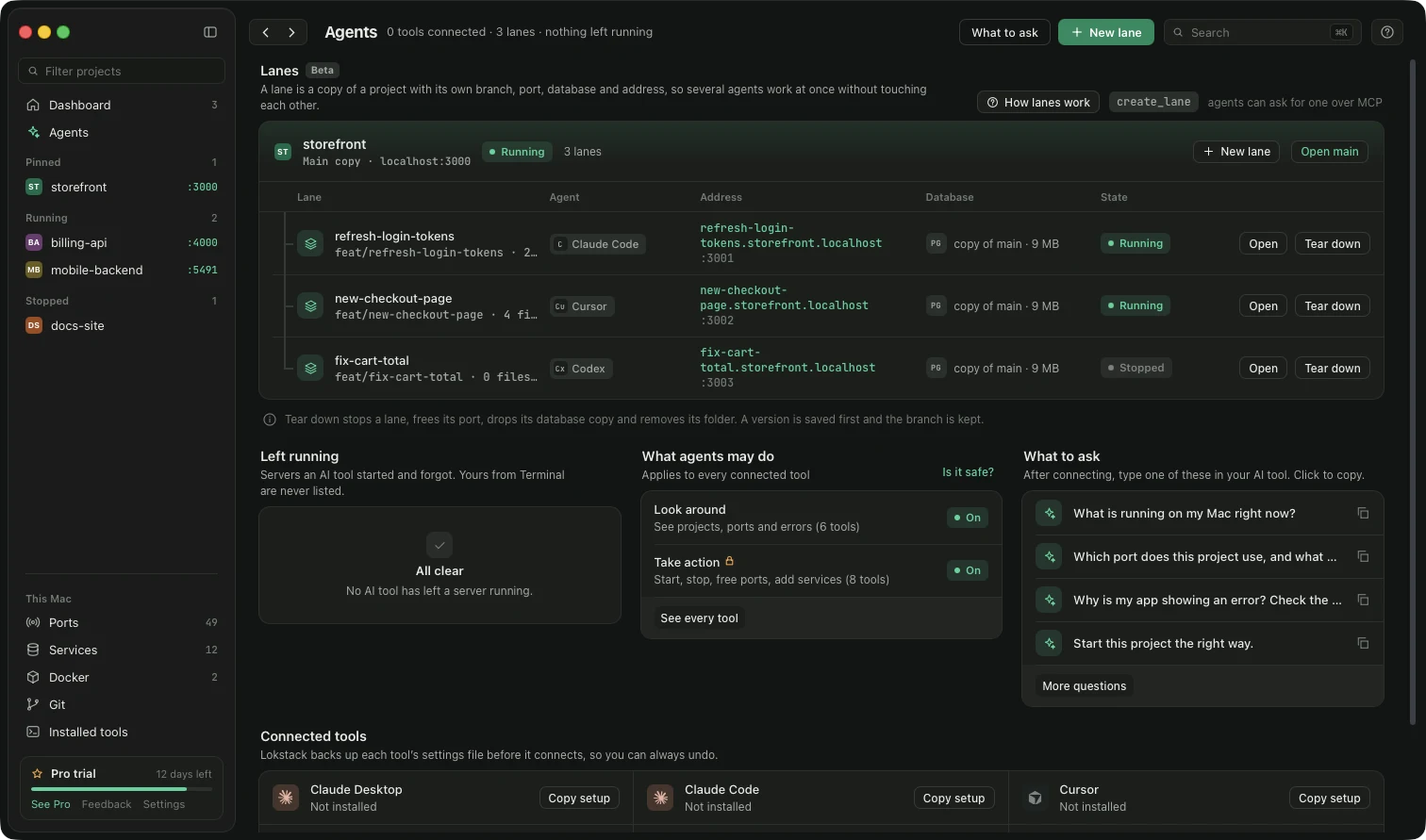
Pro. A lane is a private copy of a project for one AI agent: its own Git branch and folder, its own port, its own copy of the database and its own address. Run Claude Code, Cursor and Codex on the same project at the same time, try each result, keep the good one and throw the rest away. Your main copy is never touched.
Open Agents to see them. Each project is one card: the project itself at the top ("Main copy"), its lanes underneath. How lanes work (top right of the section) shows a picture of the whole life of a lane.
What a lane gets#
| Part | What it is |
|---|---|
| Folder and branch | A Git worktree in .lanes/<task> next to your project (never inside it), on a branch called feat/<task>. |
| Port | The next free port after the project's own (main :3000, lanes :3001 to :3009). |
| Database | Copy of main (recommended): a full copy, made with CREATE DATABASE … TEMPLATE for PostgreSQL or a dump and restore for MySQL. Share main: the same database, so changes hit your real data. Empty: a fresh database with no tables. Databases over 2 GB ask you to pick Share or Empty. |
| Address | task.project.localhost (turn on Named addresses on the Ports page). |
| Packages and .env | node_modules is linked from main (a clone-on-write copy, so it uses almost no disk). The lane's .env is a copy of main's with its own port, address and database. |
| Notes | A short section in the agent's notes file (CLAUDE.md, AGENTS.md…) with the lane's folder, port, address and database, kept out of every merge and pull request. |
Start a lane#
- Press New lane (on Agents, or New lane on a project's card), or press ⌘K and choose Start a new lane for…. An AI tool can also call
create_lane. - Pick the project and the agent, describe the task in a few words, and choose the data.
- If the project is not a Git project yet, the sheet says so and offers Turn on Git. A lane also needs at least one commit.
- Press Create lane. Lokstack shows each step live (about 10 seconds). If a step fails, everything made so far is undone and the reason is shown.
- If the database is not running, the lane is still made, without a copy, and says so clearly. It then uses main's database until you give it one.
Tick Use these choices for every new lane in this project to save them in lokstack.yml (see section 5.8).
Work in a lane#
Open a lane. A banner at the top says what to do next: Start, Try it, or Finish lane when files changed.
- Who is working, Where to try it, Its code, Its data. The data card checks the database live: Connected, Server not running or Database is gone.
- What the agent did: a live timeline (edits, starts, crashes).
- Changes: the changed files. Migrations and
.env.examplechanges are flagged because they affect main's data and settings. - Check: install, types, lint, build and tests, run inside the lane.
- Output: what the lane's app printed.
- Compare with main: whether main moved on, whether a merge would clash, new migrations and new settings.
Several lanes at once#
Each lane is independent, so two agents can build two features at the same time. Finish them one after the other: after the first is added to main, open the second and look at Compare with main. It tells you if the two touched the same lines.
Finish a lane#
Finish lane has four choices, and only you can make them:
| Choice | What happens |
|---|---|
| Add it to main | A version of main is saved first, then the branch is merged. The lane's database is not copied back; new migrations run on main's database the next time main starts. |
| Open a pull request | The branch is pushed so a teammate can look first. |
| Keep it for later | Nothing changes. The app stops and the port is freed. |
| Throw it away | The branch is deleted after a version is saved. |
Add it to main and Pull request can clean up too: stop the app, free the port, delete the lane's database copy and its folder. Main's database is never dropped, and neither is any Docker volume. Tear down does the same clean-up without merging.
For AI tools#
Four tools over MCP: create_lane, list_lanes, lane_status and teardown_lane. An agent can start and tear down lanes but can never add one to main or throw one away.
Something unclear or missing? Tell us or write to support@lokstack.app.